Live
01
Carton Packing Optimizer
Enter SKUs, carton size, and weight limits to generate loading plans, unloaded counts, 3D views, and PDF work instructions.
Open toolTradeCheckup is a set of practical tools for packaging, weight, risk, and operational instructions before cross-border ecommerce shipments. Start with the free Carton Packing Optimizer for mixed-SKU carton loading.
TradeCheckup is designed as a growing toolbox, not a single landing page. Each tool handles one concrete pre-shipment decision.
Enter SKUs, carton size, and weight limits to generate loading plans, unloaded counts, 3D views, and PDF work instructions.
Open toolEstimate per-carton and total billable weight from carton dimensions, actual weight, and carrier divisor.
Open toolSubtract product cost, packing, freight, duty, ads, platform fees, payment fees, and returns from sales to estimate profit and margin.
Open toolUse product category and risk factors to organize HS chapter candidates, declaration documents, and pre-shipment cautions.
Open toolScore product, logistics, packaging, and declaration risk factors and get the next checks to perform.
Open toolGenerate a carton label block with shipment ID, box number, destination, SKU details, weight, and carton size.
Open toolEnter amount, exchange rate, and spread to calculate a conservative planning conversion.
Open toolUse provider, percentage fee, fixed fee, and mode to calculate fees, net received amount, or required gross charge.
Open toolPaste title, bullets, keywords, and risk terms to review character count, repeated words, missing keywords, and risky words.
Open toolSplit pasted lists by line, comma, or spaces, then dedupe, normalize, sort, or extract ASINs.
Open toolUse target delivery date, production, packing, transit, safety buffer, and season to back-calculate shipment checkpoints.
Open toolInput, calculate, inspect, and share in one operational flow.
Enter carton, SKU, quantity, weight, and constraints.
Estimate loaded counts, unloaded counts, extra capacity, and utilization.
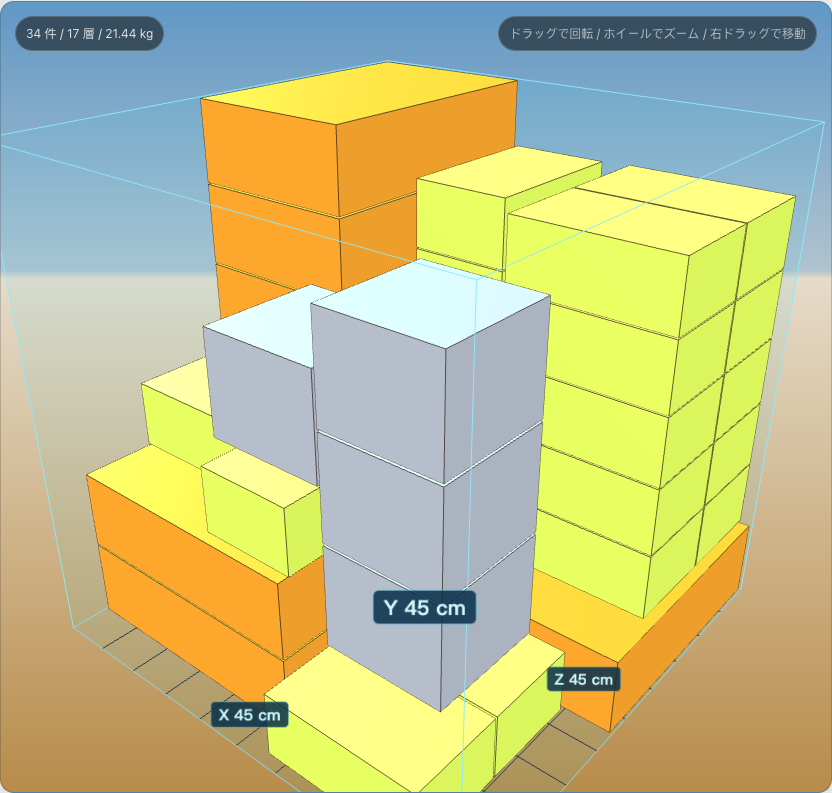
Use the 3D view to check boundaries, overlap, support, and empty space.
Download a PDF guide for the warehouse, logistics partner, or team.
TradeCheckup is a set of practical tools that help cross-border ecommerce sellers check packaging, weight, risk, and work instructions before shipment.
It uses SKU and carton constraints to generate mixed loading plans, unloaded counts, extra capacity, 3D reference views, and PDF work instructions.
No. TradeCheckup organizes pre-shipment decisions, but it does not replace logistics providers, legal advice, or customs professionals.
The toolbox now covers carton packing, dimensional weight, profit, HS research, risk checks, carton labels, currency, payment fees, listing copy, SKU cleanup, and shipping schedules.